News, reviews, and ideas you can use from librarians and library staff at RPL
Showing posts with label tutorial. Show all posts
Wednesday, March 17, 2010
New Materials, New Feature
Happy St. Patrick's Day! We're pleased to introduce the newest update to the Richmond Public Library's services - new material notification! By simply clicking the link below, you can view all new materials offered by the RPL this month.
To utilize the new material webpage, simply click on a subject in the table of contents to jump to specific materials, like DVDs or Adult Fiction. Or, you can scroll down the page to browse all new materials.
This new feature will compile on all new materials available at the RPL approximately every two weeks, so be sure to check back for regular updates.
You can view materials available at each branch, request an interlibrary transfer, or place a hold on your new materials through your online account, or simply call your local branch for further information on reserving new materials.
We're pleased to bring you this new option, and would also appreciate any feedback you have with the new page. Happy browsing!
Wednesday, December 30, 2009
Year Endertainment
Let's be honest. The title of this post is a terrible pun, and the week between Christmas and New Years should really be an additional, mandatory holiday for relaxing with your family, enjoying gifts received and given, and moving about as little as possible.
But sometimes, for those of us lucky enough to be doing all of this relaxing - especially those "relaxing" with children - entertainment sources need to be replenished. In this case, they can be replenished for free with your library card! Now is a great time to check out all of the new 2009 DVD material available at your local Richmond Public Library branch. Here's a hint:
We have this
Of course, we also have a selection of DVDs, CDs, audiobooks and books and other materials well beyond this new stock. An easy way to search the online catalog for the above new material and more is to do a Power Search in the catalog. It's easy! Here it is in a few steps, tailored to look for the newest, 2009 DVD releases.
1) Go to the Richmond Public Library site, click on the "Find Information" button near the top, and click on "Catalog."
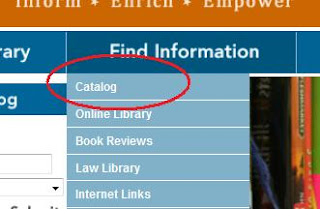
2) This will take you to the OPAC (Catalog) main search page. You will see the term "Power Search" right below the library drop down selection box. Click on "Power Search."
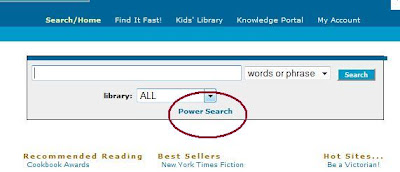
3) Below is the shot of the Power Search function. This type of search lets you tailor your options very specifically to your needs, hence the library, format, language, etc options.
In this instance, we (well, really me, because I want to see Up again) wish to look for DVDs published or released in 2009. You could use this same concept to look for CDs released in 2009, and so on.
To do this easily, we want to select the Type of material, and the Pubyear:

4) The Type category specifies the type of material. This can be magazines, games, maps and more, but we want DVDs. So select "DVD" from the list.

5) We want DVDs released in 2009, so type in "2009" in the space next to "Pubyear", hit the blue "Search" button you see below and all of the DVDs released in 2009 and available from the Richmond Public Library will be laid out before you!

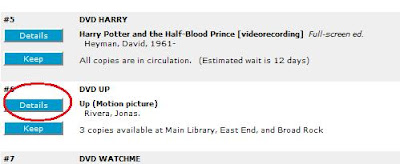
6) There are two blue buttons to the left of all of the DVD titles. The use of these buttons is probably old news to most, but bear with me.
The "Details" button will show branches where copies are available, how long the wait may be for a title, and will allow us to place a hold on the title. Click this button to place a hold and view more information.
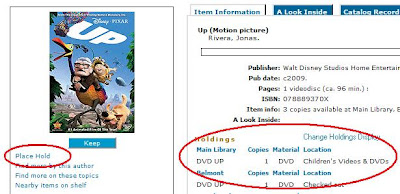
7) The Details screen shows you which branch currently has the DVD in house, and makes it easy to place the hold on your new DVD! Simply click on "Place Hold" to secure your DVD. You'll be required to enter your user ID and PIN, and then you have to drag yourself out to pick it up!
Hopefully this tutorial is of some use, and it's important to remember that the Power Search function can be a great resource to narrow any search for any type of material from the library quickly and efficiently. Email us with any questions, and we'll be happy to assist you in your search for more holiday entertainment. Happy viewing!
Wednesday, December 23, 2009
Happy Holidays
From all of us here at the RPL, we wish a very happy holiday season to all of our patrons and their families. And amazingly this year, it seems that Richmond resembles the winter wonderland picture above! Remember, the library system will be closed tomorrow, December 24 and Friday, December 25th for the Christmas Holiday.However, you can still submit reference questions during this time to the Cyberlibrarian and check out our catalog online for books or DVDs you may want to check out before the new year.

This time of year can also be a bit frantic for those looking for last minute gifts for family and friends. If you have friend or family member who loves books, the library, local art or the Richmond community in general perhaps this shameless plug will spur one last minute gift idea for you: Buy them a membership with the Friends of the Richmond Public Library!
Membership brings many benefits, including early admission to the biannual book sale, but the real benefit is contributing to the success of many special programs implemented by the library and orchestrated by the Friends. These programs include, but are not limited to; the Richmond Writers series, the Summer Reading Program and numerous other lectures, special events and community programs. Find more information here.

Looking to spend less and give more this year? The RPL has a stellar current team of volunteers, but we can never turn down a few more helping hands! Inquire at your local branch regarding their needs and see if you have time in your busy schedule to contribute to your community.
We wish you a safe and happy holiday, and hope to see you at your local branch when we reopen on Monday, December 28th.
Photos: Flickr user RSchuetz.de, the Smithsonian, Flickr user dheur
Wednesday, July 22, 2009
Pencil us in
Introducing our newest feature here on the blog - an interactive, condensed Google calendar of Richmond Public Library events! The calendar shows the same information as the Events Calendar on the main library website, but also allows you to upload any events listed for the Richmond Public Library to your own personal calendar.
The set view of the calendar is today's date, and will therefore show events scheduled at all branches for the current day. However, you can easily navigate to see future or past events by clicking on the appropriate forward or backward-facing white arrows next to the "Today" button, located to the top left of the calendar.
To jump to a coming month or to a specific day within the current month, simply click on the display of the current date at the top right of the calendar. A single click, as shown below, will display the current month's calendar and will allow you to navigate easily through that month, and to future months:

To view an event within the day you have selected, simply click once on your selected event. This creates a drop-down view within the calendar, which shows the time, place and extended details of the event. From here, you can also choose to add it to your own personal calendar. To close the detailed view of the event, click on the selected event once more.

Let us know what you think! Is this helpful to you? Easy to navigate? Any suggestions for format or content? As always, we're happy to hear from you, and happy to help in as many ways as possible.
The set view of the calendar is today's date, and will therefore show events scheduled at all branches for the current day. However, you can easily navigate to see future or past events by clicking on the appropriate forward or backward-facing white arrows next to the "Today" button, located to the top left of the calendar.
To jump to a coming month or to a specific day within the current month, simply click on the display of the current date at the top right of the calendar. A single click, as shown below, will display the current month's calendar and will allow you to navigate easily through that month, and to future months:

To view an event within the day you have selected, simply click once on your selected event. This creates a drop-down view within the calendar, which shows the time, place and extended details of the event. From here, you can also choose to add it to your own personal calendar. To close the detailed view of the event, click on the selected event once more.

Let us know what you think! Is this helpful to you? Easy to navigate? Any suggestions for format or content? As always, we're happy to hear from you, and happy to help in as many ways as possible.
Labels:
news,
technology,
tutorial
Thursday, July 09, 2009
We'll leave the light on for you
Have you ever pondered a library-related question while at home on Sunday? Or needed to obtain older city data on microfilm for a course but will be out of town for the week? Perhaps you just realized that it’s 8pm on Wednesday and you have forgotten about the new hours at the Main Library? No matter - patrons can submit their queries at any time to the Main branch by using the Reference Cyberlibrarian.
The Reference Cyberlibrarian is an online feature that lets you submit your library questions via email 24 hours a day, 7 days a week. Submitted questions are checked daily during library hours by a real live reference librarian, who will respond to your questions accordingly and, depending on the nature of your request, respond to you with an answer within 24 hours.
You can access the Reference Cyberlibrarian at cyberlibrarian@richmondgov.com or by going to the Richmond Public Library main page, clicking "Contact" in the top right corner, and clicking on the "Send email" link next to the Reference Cyberlibrarian.


As the Main Library is responsible for the care of written public records for the City of Richmond, many current requests pertain to subjects such as city directory requests or copies of records currently on microfilm. In these cases, it is important to note that (with a go-ahead from the patron to complete the copies), the library does charge a $5.00 fee for postage and photocopying. However, the Reference Cyberlibrarian is designed to be a gateway for library requests, and all questions are welcome. Better yet, your questions will be answered and sent to you in the comfort of your own home!
So go ahead and contact us. You’ll never know how much we can do for you if you don’t ask.
The Reference Cyberlibrarian is an online feature that lets you submit your library questions via email 24 hours a day, 7 days a week. Submitted questions are checked daily during library hours by a real live reference librarian, who will respond to your questions accordingly and, depending on the nature of your request, respond to you with an answer within 24 hours.
You can access the Reference Cyberlibrarian at cyberlibrarian@richmondgov.com or by going to the Richmond Public Library main page, clicking "Contact" in the top right corner, and clicking on the "Send email" link next to the Reference Cyberlibrarian.


As the Main Library is responsible for the care of written public records for the City of Richmond, many current requests pertain to subjects such as city directory requests or copies of records currently on microfilm. In these cases, it is important to note that (with a go-ahead from the patron to complete the copies), the library does charge a $5.00 fee for postage and photocopying. However, the Reference Cyberlibrarian is designed to be a gateway for library requests, and all questions are welcome. Better yet, your questions will be answered and sent to you in the comfort of your own home!
So go ahead and contact us. You’ll never know how much we can do for you if you don’t ask.
Labels:
Main,
technology,
tutorial
Subscribe to:
Posts (Atom)